

The Amazon listing photos for the Airlonv desk lamp make it look like it will swing halfway across a desk and light up a whole workspace with one motion of the arm. After living with mine for a while now, I can tell you that is not quite how it goes, and there are a handful of things about this lamp that only show up once you have actually clamped it to a real desk instead of looking at a product photo shot with a wide lens and a tidy studio desk behind it.
I already wrote a longer piece about using this Airlonv lamp through a full season of evening work, and that one covers how it held up over months of nightly use. This one is different on purpose. This is the stuff I wish someone had told me before I clicked order, the desk-thickness limit, the real reach of the arm, whether the color temperature actually matches the numbers on the box, whether the dimming really is as smooth as the listing claims at every step, and why I think a meaningful chunk of buyers end up returning this thing within the first couple weeks for reasons that have nothing to do with the lamp being broken.
The Quick Verdict
A solid lamp for the money once you know its real limits going in, but the listing photos oversell the reach and undersell how short the power cord is, and that mismatch is probably why some buyers send it back.
Amazon Check Today's Price →Before you order one, know what the photos don't show you.
The Airlonv works well once you've set expectations correctly. Check today's price and current availability, then read on for the specifics the listing skips.
Amazon Check Today's Price on Amazon →How I Actually Tested It
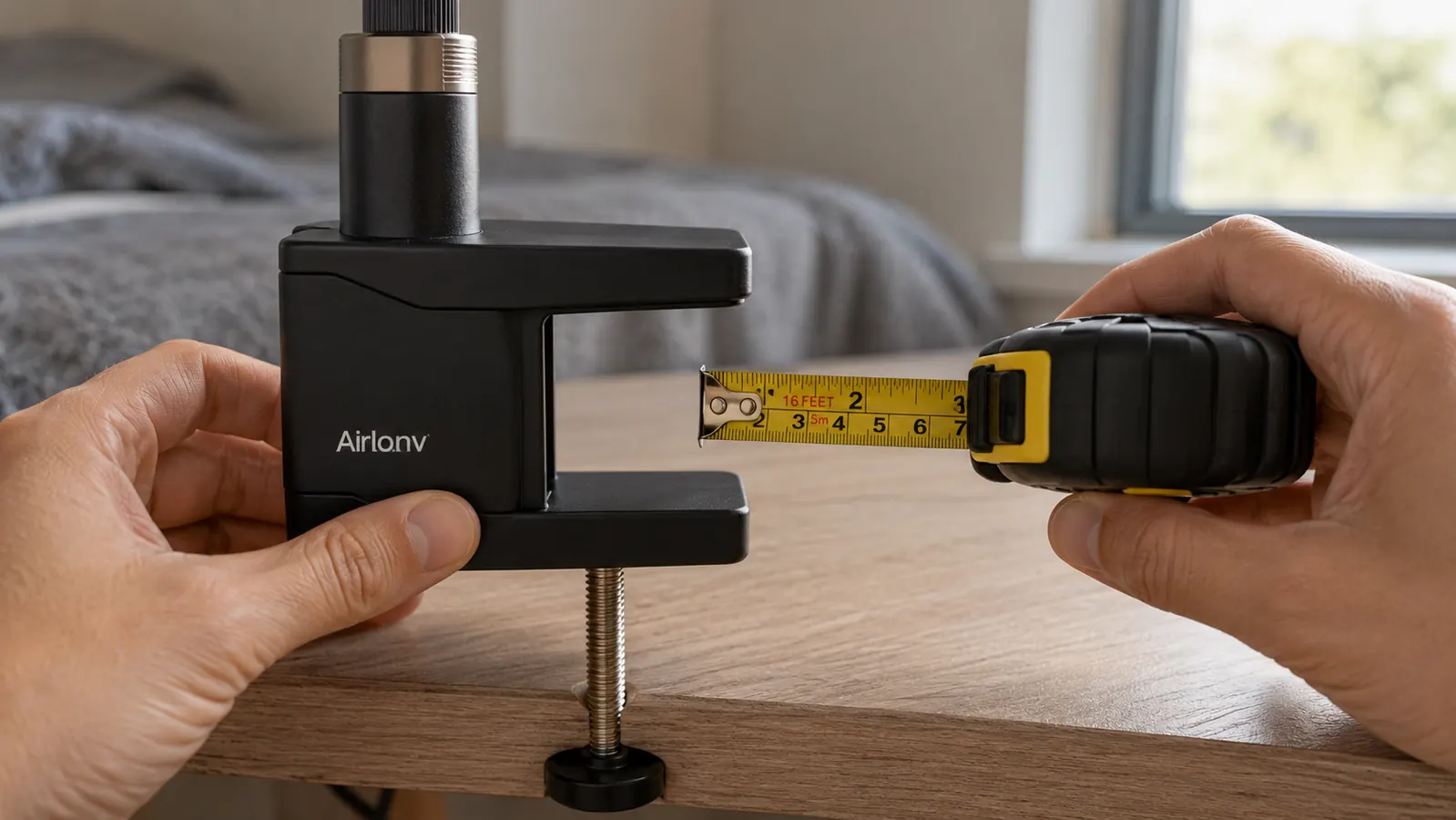
I did not just set the Airlonv on my desk and start typing. Before I even plugged it in, I measured my desk edge, checked the clamp gap with a tape measure, and tried mounting it in three different spots to see how the geometry worked out. I wanted to know, before I formed an opinion on brightness or color, whether the basic physical fit matched what the listing implied. It is a habit I picked up after ordering enough desk accessories over the years that looked fine in a photo and then fought me the moment they arrived.
The box itself is smaller than I expected. Inside you get the lamp head and gooseneck arm pre-attached to the clamp base, a separate power adapter, and a fairly short cord connecting the two. There is no extension cord included, no separate mounting hardware beyond the clamp screw, and the instruction sheet is a single folded page that covers button functions but says almost nothing about desk compatibility. That last part matters more than it sounds like it should, and I will get into why in a minute.
Once mounted, I ran the Airlonv through every brightness step and every color temperature setting with a light meter app on my phone, not because I doubted the LEDs work, but because I wanted real numbers instead of just an impression of looks about right. I also tested it on two different desks, my regular desk and a thinner folding table I keep in a closet for overflow work, specifically to find where the clamp stopped fitting comfortably and where it started to strain.
I timed the setup too, since a lot of listing photos imply a lamp like this snaps on in seconds. From opening the box to having it clamped, plugged in, and adjusted to a usable angle took me closer to ten minutes the first time, mostly because I stopped to check the clamp fit twice before committing to tightening it all the way down. On the second desk, it took longer, because I had to fiddle with the angle of the jaw against that trim strip I mentioned. None of that is a dealbreaker, but if you are expecting a thirty-second install, budget a little more time than that.
The Desk-Thickness Limit the Listing Barely Mentions
This is probably the single most important thing to check before you order, and it is buried in small print rather than called out clearly anywhere in the main photos. The Airlonv's clamp opens to a maximum gap that fits most standard desks, the kind with a top somewhere around three-quarters of an inch to a little over an inch thick, which covers most laminate and solid-wood desks sold for home offices. Mine fit without a fight, clamped down snug on the first try.
The folding table in my closet is a different story. Its edge lip is thinner, but it also has a raised trim strip that got in the way of the clamp jaw closing evenly. I got it to mount, technically, but the clamp sat at an angle instead of flush, and I would not trust it with the arm extended all the way out over a full evening of use. If your desk has a rounded edge, a thick trim strip, or a glass top with a metal frame lip, measure before you buy rather than assuming a clamp lamp is a clamp lamp.
I would guess this is one of the more common reasons people return the Airlonv without ever really testing the light output at all. They get it home, find the clamp does not sit right on their particular desk edge, and send it back within the return window rather than trying to work around it. If you have got a desk with an unusual edge profile, it is worth checking the clamp opening dimensions against your desk before you order rather than finding out after it has already arrived and you are staring at a lamp that will not sit level.
There is a workaround I stumbled onto for the borderline case, which is loosening the clamp screw all the way, seating the jaw fully against the desk edge by hand, and then tightening slowly while checking the angle every quarter turn instead of cranking it down in one motion. That got my folding table mount close enough to trust for light use, though I still would not call it ideal. If your desk edge is anything but a standard flat profile, that slower approach is worth trying before you give up on the fit entirely.
The Reach Is Shorter Than the Photos Imply
The gooseneck arm is listed at 17 inches, and that number is accurate, but the photos on the listing use wide-angle shots that make the lamp look like it can sweep across a whole desk surface from one corner. In practice, once you account for the clamp taking up space at the base and the lamp head itself adding a few more inches beyond the arm's length, the actual usable reach from the clamp point to where the light actually lands on your desk is noticeably shorter than what the marketing images suggest at a glance.
On my desk, mounted at the right rear corner, the light comfortably covers my keyboard and a notepad next to it, but it does not reach far enough to illuminate the far left side of my desk where I sometimes spread out paperwork or a second monitor stand. If you are picturing this lamp lighting an entire wide desk from one corner clamp, adjust that expectation now. It is built to light a task area directly in front of where it is mounted, not the whole surface, and that is a fine tradeoff for most people, but it is not what the product photos communicate at a glance.
If your desk is wider than about four feet and you want even coverage across the whole surface, you would likely need to mount this lamp closer to the center of the desk rather than a corner, or accept that one side will stay dimmer than the other. I ended up mounting mine slightly more toward the middle of the right edge than I originally planned, purely because the corner position left too much of my keyboard in shadow once I actually sat down and started working under it.
Color Temperature: Close to Advertised, Not Exact
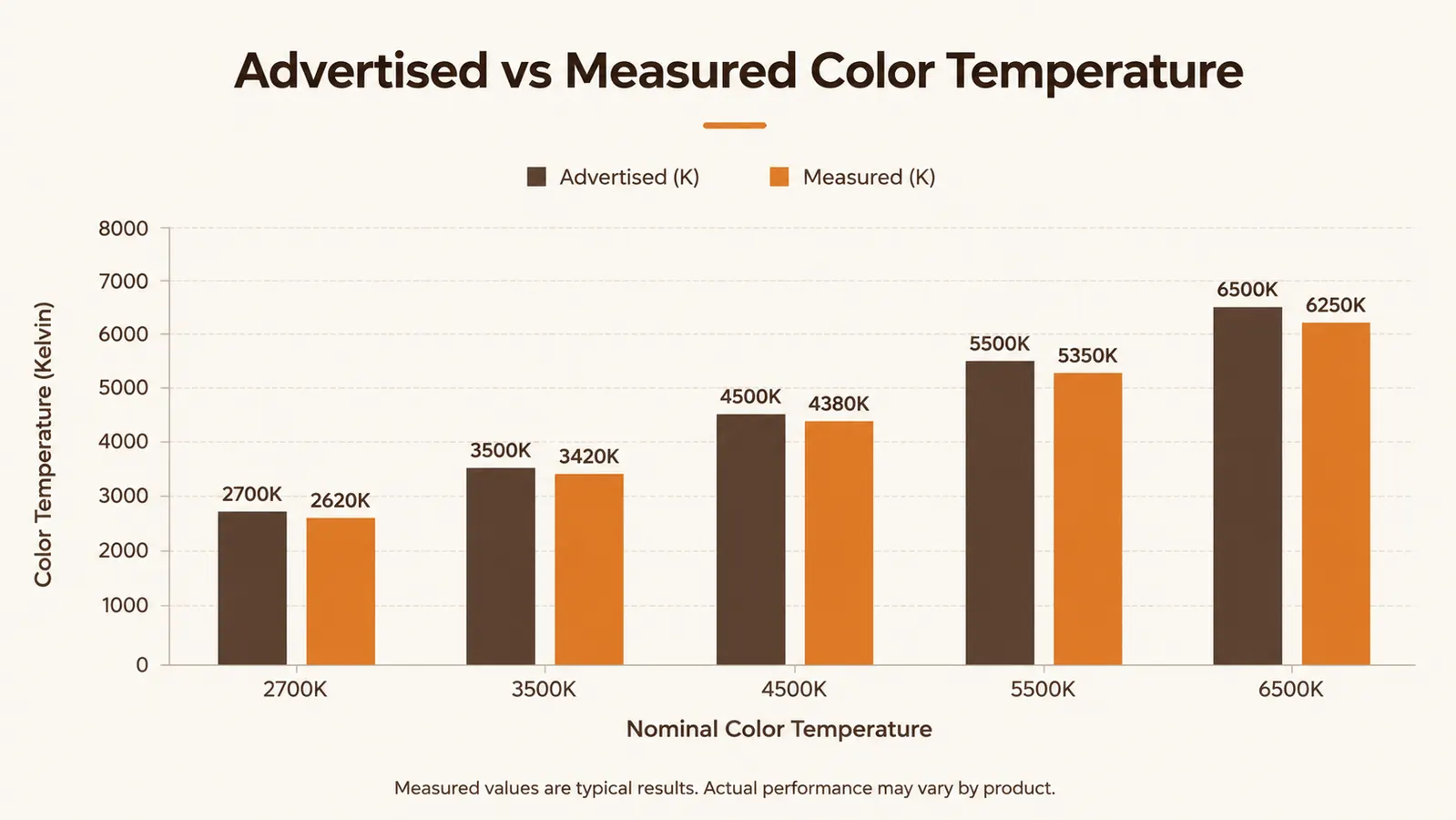
The listing advertises a 2700K to 6500K range, from warm amber to cool daylight blue-white, adjustable across five steps. I ran the light meter app against each of the five settings and got numbers that were in the right neighborhood but not dead-on the advertised figures. The warmest setting read closer to 2900K than 2700K, and the coolest setting landed a bit under the claimed 6500K, closer to 6100K on my meter.
None of this is a big enough gap to matter for most desk work. I am not trying to color-match paint swatches under this lamp, I am trying to read a screen and take notes without my eyes fighting the light. For that purpose, the color range performs as advertised in spirit even if the exact Kelvin numbers are a little soft. If your use case is more exacting, photography editing or anything where color accuracy actually matters for your work, I would treat the advertised numbers as a rough guide rather than a lab-verified spec you can build a workflow around.
What I will say in the Airlonv's favor is that the shift between steps is smooth and consistent across the whole range. There is no obvious color cast or greenish tint at any setting, which is something cheaper lamps in this price range sometimes struggle with, especially at the middle steps where a lot of budget LEDs get muddy. The color just runs slightly warmer at every step than the box implies, which in my experience made the light feel a touch cozier than expected rather than worse.
Dimming at the Low End Isn't Quite as Smooth as Advertised
The stepless dimming works well through the middle of the range, and I have no complaints there. Where it gets less impressive is at the very bottom, the lowest brightness levels just above off. Sliding the touch panel down toward minimum, I noticed the light does not dim in a perfectly even curve, it seems to hold steady for a stretch and then drop more abruptly right near the bottom rather than tapering smoothly all the way down like the middle of the range does.
It is a minor thing in daily use, since most people are working somewhere in the middle-to-upper brightness range anyway, not hovering at the dimmest possible setting for hours at a time. But if you were hoping to use this as a near-candlelight night light at the absolute bottom of its range, be aware the low end is not quite as fine-grained as the stepless marketing language suggests. I did not catch any flicker at low brightness on a slow-motion camera test, just a less gradual step than at every other point in the range, which is a different issue than flicker entirely.
I also noticed that the touch panel's response to a slow drag is more precise than a quick swipe. If you drag your finger slowly from top to bottom of the dimming strip, you get much finer control near the low end than if you swipe quickly and expect it to land exactly where you released. That took me a week or two to figure out, and once I adjusted how I interacted with the panel, the low-end dimming stopped bothering me as much.
The Power Cord Is Shorter Than You'd Guess
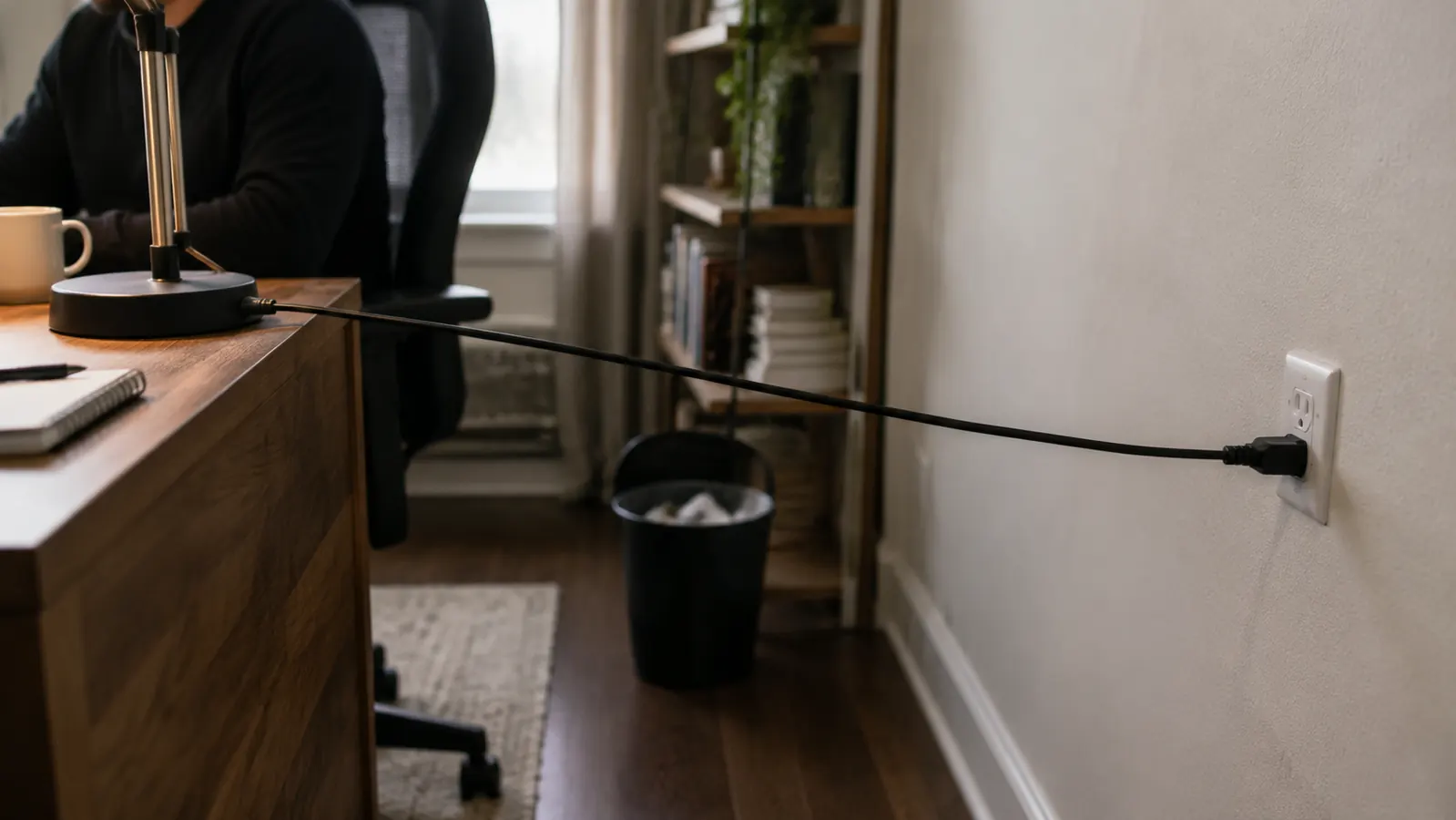
Nobody talks about this, and it genuinely surprised me when I first plugged it in. The cord running from the lamp base to the wall adapter is on the short side, short enough that if your outlet is not within a few feet of where you are mounting the lamp, you will need your own extension cord or a power strip nearby. On my desk, the outlet happens to be close, so it was not an issue for me, but I could see this being a real annoyance for anyone whose desk sits away from the wall or whose nearest outlet is behind furniture or across the room.
This is exactly the kind of detail that does not show up in a five-star or one-star review, because it is not really about the lamp's performance, it is about your specific room layout and where your outlets happen to be. But it is worth checking your outlet distance before you order, because a short cord stretched tight across a desk is not just inconvenient, it is also more likely to get snagged or tugged over time, and I would rather flag it now than have you discover it after the lamp is already clamped on and the cord is pulling at an awkward angle every time you shift in your chair.
If you do end up needing an extension cord, a short flat one that can run along the back edge of the desk works better than a bulky round one, since it keeps from adding more clutter to a desk that is already carrying a keyboard, a mouse, and whatever else you have got going on. It is a small thing, but it is the kind of small thing that changes whether this lamp feels like a clean addition to your desk or one more cord to manage.
What I Liked
- Clamp fits standard desk thicknesses without any fuss once you've confirmed your desk edge is a normal profile
- Color temperature shift between steps is smooth with no visible tint or cast
- Stepless dimming works well through the middle of the range where most people actually use it
- Light output at the higher brightness steps genuinely matches a task-lamp level of usefulness for close work
- No detectable flicker even at the trickier low-brightness steps
Where It Falls Short
- Desk-thickness compatibility isn't clearly spelled out in the listing, worth measuring your desk edge first
- Usable reach is shorter than the wide-angle listing photos suggest
- Advertised color temperature numbers run a little warmer in practice than the box claims
- Dimming at the very lowest brightness steps isn't as gradual as the stepless claim implies
- Power cord is short enough to matter if your outlet isn't close to the desk
The lamp itself does what it is supposed to do. Most of what surprised me had nothing to do with the light and everything to do with the cord length and the clamp fit nobody mentions until you are holding a tape measure.
Who This Is For
If you have a standard desk with a normal edge thickness, an outlet within a few feet, and you are looking for a task lamp to light a keyboard and notepad rather than an entire desk surface, the Airlonv does that job well and the price is fair for what you get. For the fuller picture of how it holds up over months instead of just the unboxing, I covered that separately in my season-long Airlonv review after real evening use, which gets into the clamp wear and touch panel responsiveness over time.
Who Should Skip It
If your desk has an unusual edge, thick trim, a rounded lip, or a glass top with a metal frame, measure the clamp opening against your desk before ordering, because that mismatch seems to be the most common reason people send this one back. If your desk is unusually wide and you need even light coverage corner to corner, this single-arm lamp is not built for that job either. And if you are trying to decide whether a dedicated lamp is even worth adding versus just working under your room's overhead light, I laid out that comparison directly in desk lamp versus overhead lighting for focus at a home desk.
Know the real limits, then decide if it fits your desk.
Measure your desk edge and your outlet distance first. If both check out, this is a genuinely solid task lamp for the price. Check today's price on Amazon before you order.
Amazon Check Today's Price on Amazon →