

Five months ago I switched to the Logitech Lift vertical mouse after two years of a dull ache that ran from my right wrist up into my forearm by about two in the afternoon most workdays. I write for a living out of a spare bedroom here in Boise, eight to ten hours a day, most of it clicking and scrolling far more than I ever expected a desk job to involve. I had already swapped chairs and raised my monitor to eye level, and the ache barely moved either time. The mouse was the last thing I was willing to try, mostly because I figured a mouse was a mouse and this whole vertical shape thing was a gimmick. I was wrong, and this is the long version of why.
I bought the graphite Logitech Lift in the small size, which the sizing chart on the box said was right for my hand, and I have used it every workday since early March. Five months is long enough to get past the honeymoon period, live through the battery going flat once, and watch the rubberized side grip start to show a little wear. This is not a first-impressions post written after a weekend with the box. It is what the mouse actually looks and feels like after a real, unglamorous stretch of daily use at a home desk.
The Quick Verdict
A genuinely different mouse shape that quieted my wrist ache within five or six weeks, though the adjustment period and the wear on the side grip are worth knowing about going in.
Amazon Check Today's Price →Still Reaching for a Flat Mouse Every Afternoon?
If your wrist starts aching by 2pm the way mine used to, it is worth trying the Logitech Lift before you spend money on wrist braces, or before you just decide the ache is part of the job.
Amazon Check Today's Price on Amazon →How I've Used It
I run the Logitech Lift on the small USB-A Logi Bolt receiver plugged into a cheap powered hub on my desk, not over Bluetooth, because I noticed the Bluetooth connection buffered for a fraction of a second every time my laptop woke from sleep. That tiny lag was enough to bother me during video calls, so I switched receivers back in April and have not had a dropped connection since. My desk is small, maybe four feet across, crammed into a spare bedroom with a north-facing window, so cable clutter and dongle placement actually matter to me in a way they might not for someone working in a bigger room.
A typical day is eight to ten hours of writing, research, and spreadsheet work, with maybe two hours of that spent actually clicking around rather than typing. I do a lot of tab switching, a lot of highlighting text to move it into outlines, and a fair amount of scrolling through long PDFs for client research. None of that is dramatic mouse use compared to, say, a video editor or a graphic designer dragging timelines around all day. But it is steady, and steady is exactly what wears a joint down over the course of a year, not the occasional heavy session.
Before the Logitech Lift, I was using the mouse that came bundled with my keyboard, the kind nobody actually picks out, it just shows up in the box and you keep using it out of inertia. I never thought about my hand position until the ache showed up, and once it did, I spent a few weeks trying cheaper fixes first, a gel wrist rest, a lower chair setting, before I looked into vertical mice at all.
The First Three Weeks: Adjusting to a 57-Degree Angle
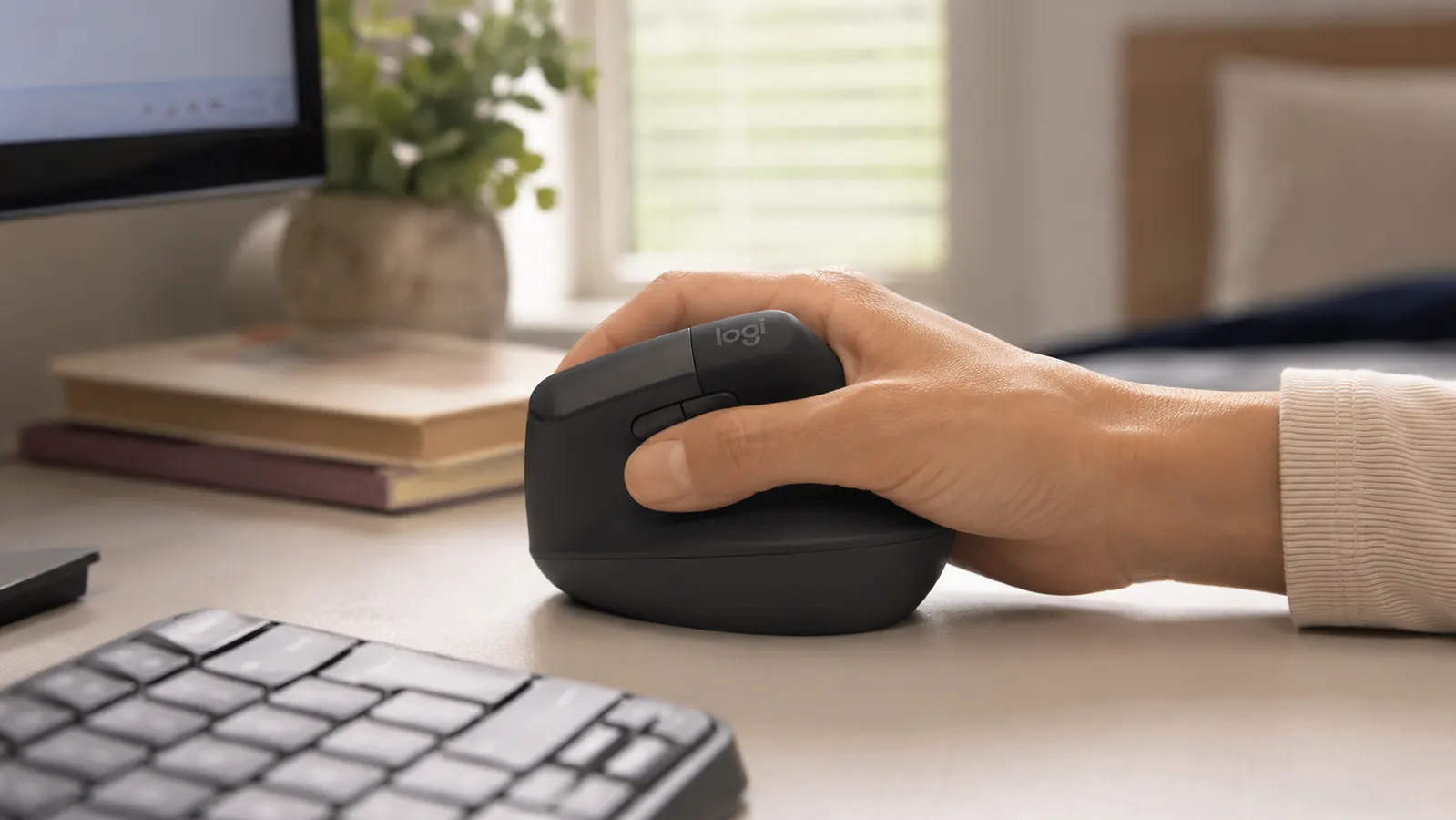
The Logitech Lift sits your hand at roughly a 57-degree angle instead of flat, so your palm faces mostly sideways instead of down toward the desk. The first week, my accuracy was noticeably worse. I overshot buttons, missed small UI elements, and had to slow down during anything that required precision, like resizing spreadsheet columns or selecting a single word inside a dense paragraph. It felt like relearning to write with my off hand, just a smaller, quieter version of that same clumsiness.
By the end of week two, most of that clumsiness was gone. I stopped consciously thinking about the angle and started reaching for the mouse the same way I used to reach for my old one, without a second thought. What lingered longer was speed on fast, wide movements, the kind you make dragging a window across two monitors or scrubbing through a long document. That took closer to five weeks to feel fully natural, which is longer than most quick reviews mention, probably because most reviews get written in the first few days rather than the first few months of ownership.
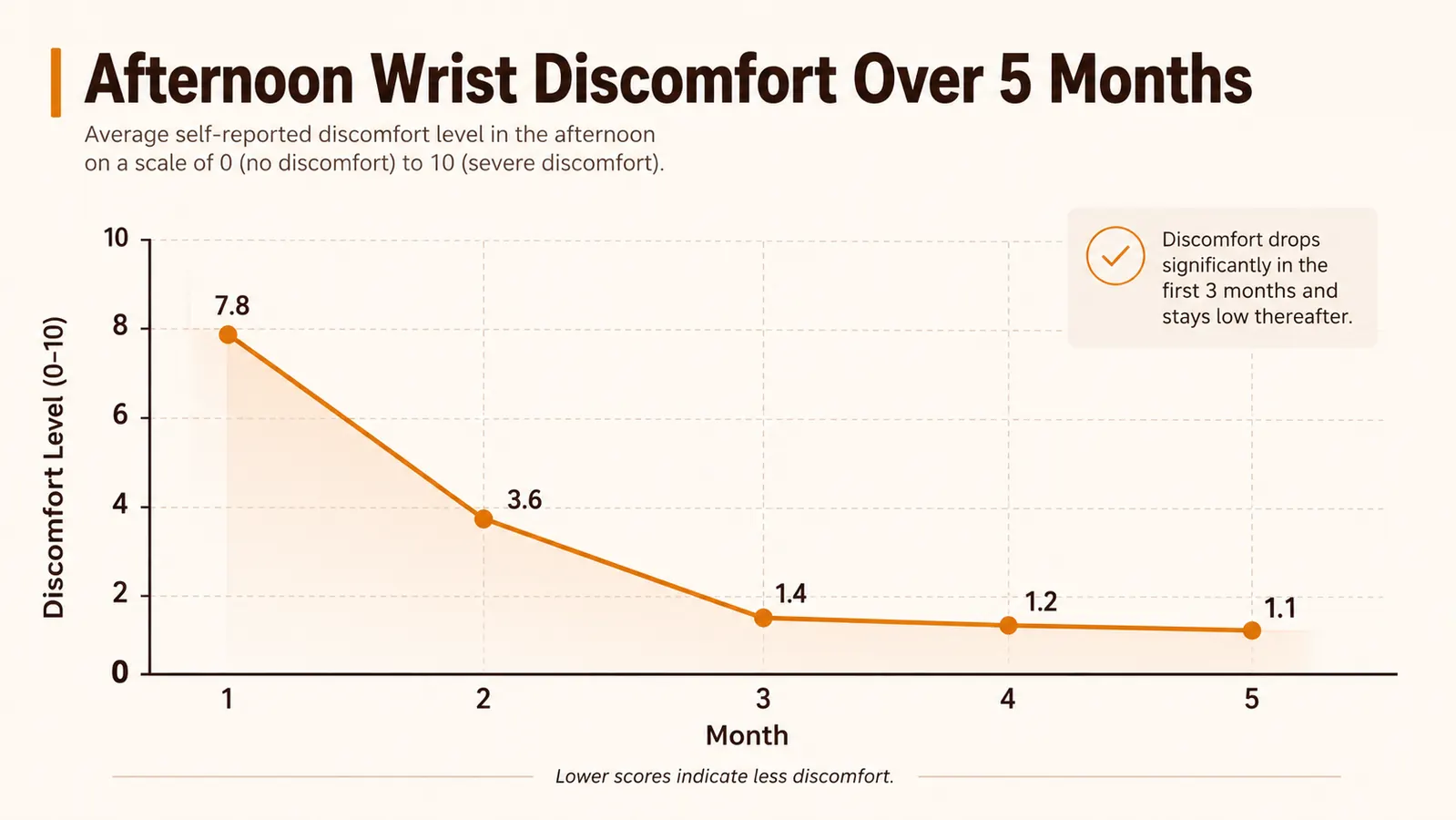
The wrist ache itself did not disappear overnight either, and I think this is the part people most want a straight answer on. It faded gradually over that same five or six week window, going from a daily 2pm annoyance to something I would only notice after an unusually long stretch of clicking. I want to be honest that it was not instant relief. Anyone expecting the ache to vanish in three days is going to be disappointed, and might give up on the adjustment period before the shape actually has a chance to help.
Battery Life Over Five Months
Logitech rates the Lift at up to 24 months on a single AA battery. I obviously have not hit that mark yet, but five months in, I am still on the original battery, with the indicator light in Logi Options+ showing roughly half remaining. That tracks reasonably close to their estimate if I extrapolate it out across a full year, maybe landing a little short of two years but not dramatically so, and certainly not the kind of exaggerated claim you sometimes see on mouse packaging.
I keep the mouse on the whole time I am working and let it sleep automatically when I step away, which is the default behavior out of the box. I never turn it off manually, and I have not noticed the battery draining any faster because of that habit. The one time it did die, Logi Options+ gave me a low-battery warning about a week ahead of time, so I was not caught mid-task with a dead mouse and a deadline. Swapping the AA took about ten seconds, no pairing dance, no re-syncing the receiver, no lost settings.
Compare that to a mouse that needs charging every week or two, which is common with some of the flatter ergonomic options I looked at before buying, and the AA battery setup on the Logitech Lift is genuinely one of its better long-term features. I do not have to remember a charging cable, and I have not once had a dead mouse sitting there mid-deadline because I forgot to plug it in the night before, which used to happen with my old wireless keyboard more than I would like to admit.
How the Coating and Clicks Have Held Up
The rubberized side grip, where your thumb rests, has started to show light shine after five months of daily contact, the kind of subtle wear you would expect on any rubberized coating that gets touched for eight to ten hours a day, five days a week. It is not sticky and it is not degrading, just slightly smoother than it was on day one. I have read complaints online about that coating getting gummy after a year or two of ownership, so I am watching it closely, but I have not seen any sign of that yet at the five month mark.
The clicks are still quiet, noticeably quieter than my old mouse, and they have not developed any of the rattle or double-click issue that some cheaper mice pick up after heavy use. The scroll wheel still has the same amount of resistance it had back in March, no looseness, no skipping steps. The four customizable buttons I actually use, back, forward, and two I have mapped to window-snap shortcuts, still respond exactly the way they did the first week I set them up in Logi Options+.
The one physical thing that has changed is a faint discoloration on the top surface where my palm rests most, visible mostly in direct light and honestly easy to miss unless you are looking for it. It does not affect function at all, it is purely cosmetic. I mention it because most reviews of the Logitech Lift are written in the first two weeks and would not catch something like that, and I would rather you hear it from someone who has actually put in the months.
Alternatives I Considered First
Before landing on the Lift, I looked at three other options: a trackball mouse a coworker swears by, a fully vertical mouse with a steeper 90-degree angle, and just sticking with an ergonomic keyboard plus a wrist rest under my existing flat mouse. The trackball felt like too big a relearning curve for someone working on client deadlines, and the 90-degree mouse felt aggressive right out of the box, more like a medical device than something I actually wanted to reach for casually all day.
The Logitech Lift's 57-degree angle was the middle path, enough of a change to actually shift how my wrist sits through the workday, not so much that it felt like starting completely over from zero. I also weighed price relative to the other ergonomic mice in that middle category, and the Lift landed in a reasonable spot, not the cheapest vertical mouse out there but not the most expensive either. If you want the full case for why the shape helps in the first place, I laid that out separately in 10 reasons a vertical mouse helps wrist pain.
Size mattered more than I expected going in. I have average-sized hands, and the small version of the Lift fits my palm without my fingers curling awkwardly over the front edge, which happened when I tried a demo unit of a larger vertical mouse at a friend's desk. If your hands run larger, it is worth checking Logitech's size chart before ordering, because the wrong size undoes a good chunk of the ergonomic benefit no matter how good the angle is on paper.

Would I Buy the Logitech Lift Again After Five Months
Yes, and honestly I would not hesitate the second time around now that I know the adjustment period is real but temporary. The version of me back in February who was skeptical of a mouse making any real difference was wrong, and I do not say that lightly after two years of assuming the ache was just part of sitting at a desk all day. The wear I am seeing on the side grip is cosmetic, the battery is still on its first charge, and the clicks and buttons feel the same as the day I unboxed it.
What I would tell someone considering it is to plan for the first month being a little slower and a little less accurate, not a dealbreaker, just an honest cost. Set it up during a slower work stretch if you can, not the week before a big deadline. Past that first month, the Logitech Lift has just quietly been my mouse, not a novelty, not an experiment, just the thing my hand reaches for without thinking, which is really the whole point of switching in the first place.
What I Liked
- Wrist ache genuinely faded within five to six weeks of daily use
- Quiet clicks compared to my old bundled mouse
- AA battery still going strong at five months, no charging cable to manage
- Logi Bolt USB receiver connection has been rock solid, no dropouts
- Customizable buttons still respond exactly the same as week one
Where It Falls Short
- Accuracy noticeably drops for the first two to three weeks while you adjust
- Side grip coating shows light shine and wear after regular daily contact
- Costs more than a basic mouse, which is a real tradeoff if budget is tight
- Bluetooth mode had a small wake-from-sleep lag, so I switched to the USB receiver
- Not an instant fix, results take weeks, not days
The ache did not disappear in three days. It faded over five or six weeks, and that timeline is the part most reviews skip.
Who This Is For
This is for anyone doing five-plus hours of daily mouse work who has already tried the obvious fixes, a better chair, a raised monitor, a wrist rest, and is still getting an ache by mid-afternoon. It is also a good fit if you want a middle-ground shape, less extreme than a full 90-degree vertical mouse but a real change compared to a wrist rest under a flat mouse. Writers, analysts, and anyone doing heavy spreadsheet or research work at a home desk like mine will probably notice a difference within a month or two of steady use.
Who Should Skip It
If you need fast, exact clicking for design work, gaming, or detailed photo editing right out of the box, the first two or three weeks of reduced accuracy might not be worth the tradeoff for you, at least not during a busy season when you cannot afford to be slower. It is also not the right pick if you are only dealing with occasional, mild discomfort rather than a real daily pattern, a cheaper wrist rest under your existing mouse might solve that without any relearning curve at all.
Five Months In, I'd Buy the Logitech Lift Again
If the 2pm wrist ache sounds familiar, give the adjustment period a real chance. Most of what bothered me in week one was gone by week five.
Amazon Check Today's Price on Amazon →