
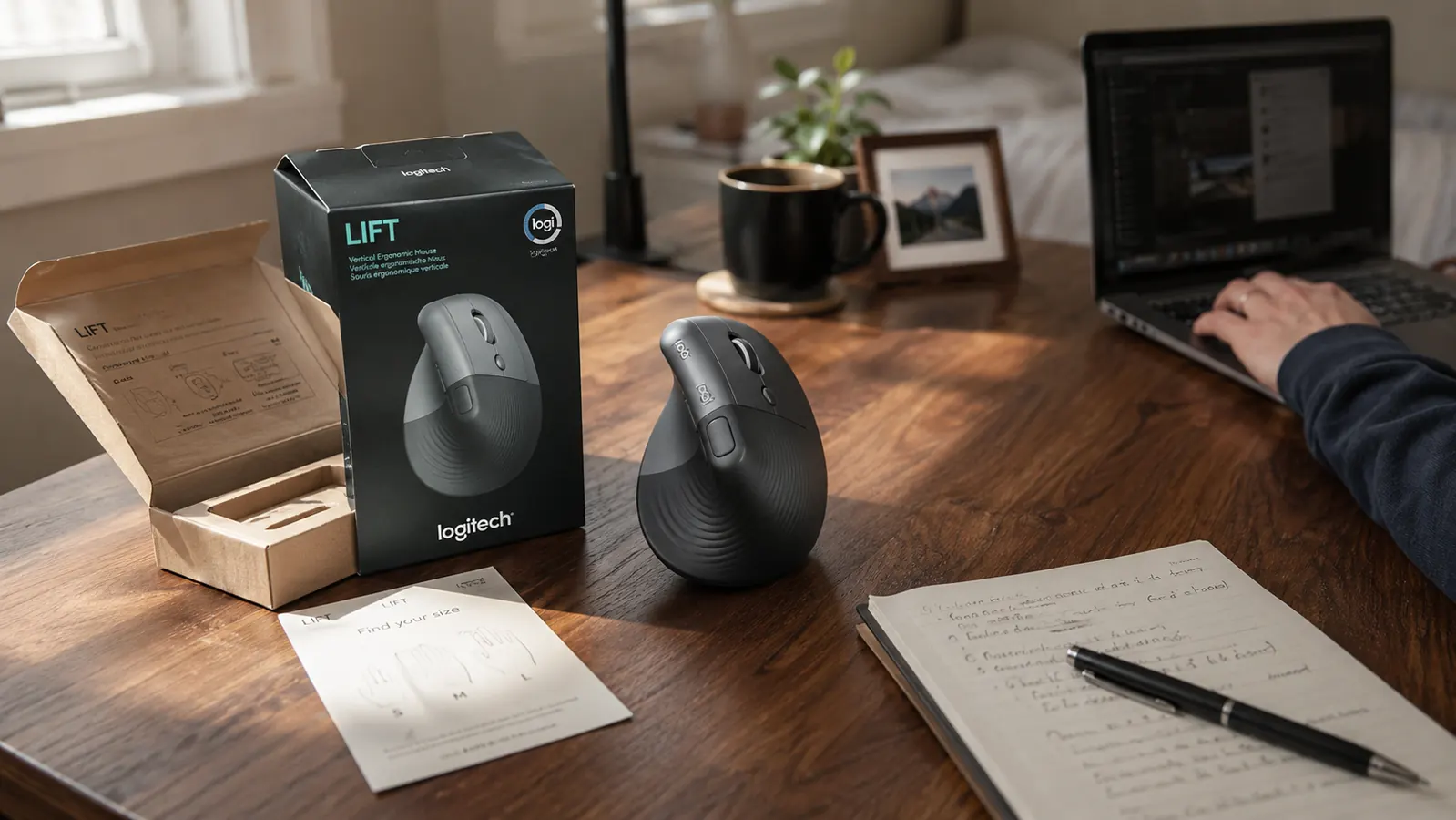
I ordered my Logitech Lift on a Tuesday night without reading past the star rating, figured a mouse is a mouse, picked graphite because it matched my keyboard, and clicked buy. What I did not notice until the box was already open on my desk was a small sizing chart printed on the inside flap, the kind of detail that is easy to miss when you are shopping from a phone at eleven at night. That chart mattered more than I expected, and it is the first of several things about this mouse that the listing photos do not make obvious before you order. I have since gone back and looked at the main product page with fresh eyes, and the sizing information is technically there, just buried under a stack of bullet points about buttons and battery life that most shoppers skim past.
This is not another walkthrough of why a vertical mouse can ease wrist strain, I have written that one already. This is the version I would want if I were about to click order tonight, the stuff that only shows up after living with the mouse for a while and reading through a stack of the other reviews people have left, the sizing confusion, the hand dominance limit, the software step nobody mentions, and the button layout that takes longer to feel natural than the marketing copy implies. None of this is meant to talk you out of buying it. It is meant to make sure the version that shows up on your desk actually has a fair shot at working for you.
The Quick Verdict
A genuinely comfortable mouse once it fits your hand and you have the software running, but the ordering process has more landmines than the product page lets on.
Amazon Check Today's Price →Before You Add This to Your Cart
Check the sizing chart and the hand dominance question before you order, not after the box shows up. If it still fits your setup, here is where to check today's price.
Amazon Check Today's Price on Amazon →How I Actually Put It Through Its Paces
I run a spare-bedroom office in Boise and write for a living, so my testing was not a lab, it was a real workweek, plus a week of handing the mouse to my brother-in-law when he visited, since he is left-handed and I wanted to see what happened when someone with a different grip and a different dominant hand actually tried using it for ordinary tasks. I also spent a rainy Saturday reading through a large chunk of this product's reviews on Amazon, sorted by lowest star rating first, because the one-star and two-star reviews tell you things the five-star ones never bother to mention.
Between my own daily use, my brother-in-law's week with it, and everything I read in those lower-rated reviews, a pattern showed up fast. Almost none of the real complaints were about how the mouse performs once it is set up correctly. Nearly all of them were about the setup itself, the size not matching the buyer's hand, the hand dominance mismatch, or the software step getting skipped entirely. That is the gap this review is trying to close, and it is a gap the marketing copy has no real incentive to fill in for you.
I want to be upfront that the Logitech Lift has held up fine for me mechanically. The clicks are still quiet, the scroll wheel has not loosened, and I have not had a dropped connection through the USB receiver. None of that is the story here. The story is everything that happens before the mouse ever gets a fair shot, and how often that stage goes wrong for people who did not know to watch for it, sometimes badly enough that they box the mouse right back up within the first few days.
The Small Shell Nobody Explains Clearly
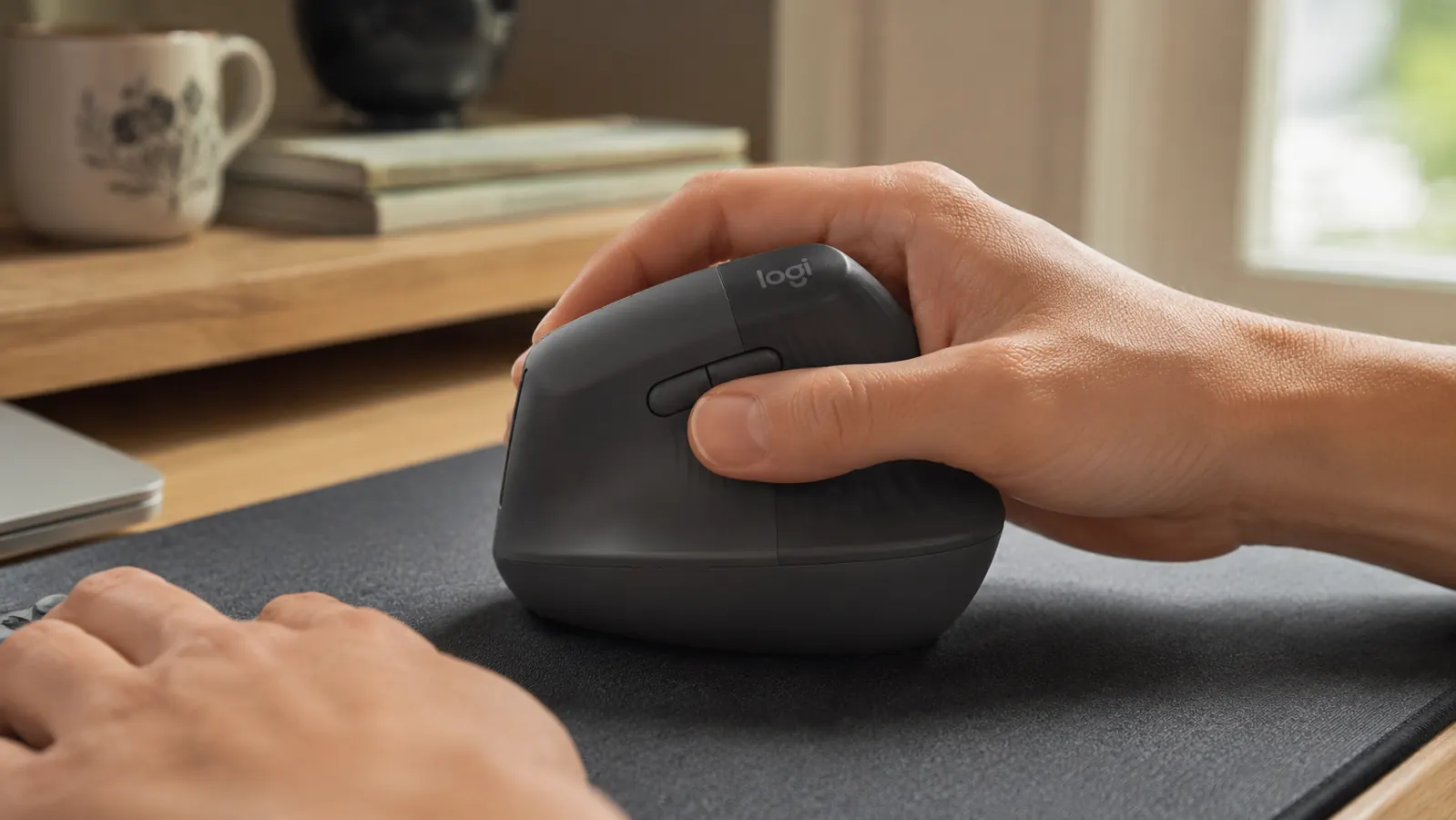
The Logitech Lift ships in a single compact shell built around a hand-size chart on the box, and it is easy to confuse with Logitech's larger vertical mouse, the MX Vertical, which sits taller and wider. They look related in thumbnail photos and get lumped together in a lot of shopping comparisons, but they are built for different hand sizes and different grip styles, and the product page does not spell that difference out anywhere near clearly enough for a quick scroll-through purchase made on a phone during a lunch break.
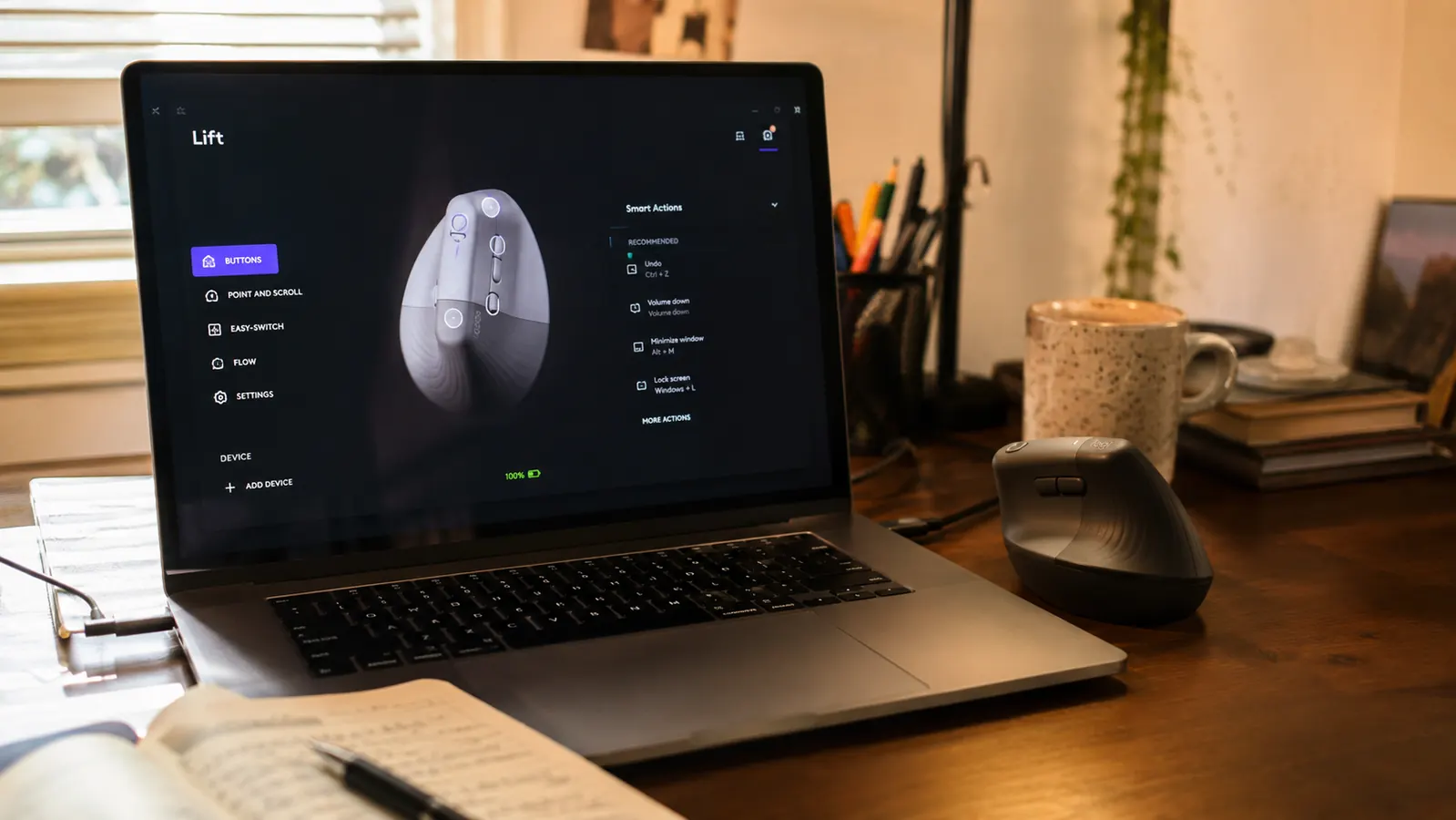
If your palm runs on the larger side, the Lift's shell can feel cramped by the second or third hour of the day, your fingers curling slightly past the front edge instead of resting flat on it. That is not a defect, it is a sizing mismatch, and it is the single most common complaint I found buried in the lower-rated reviews. People assumed a vertical mouse from Logitech was a vertical mouse from Logitech, and did not realize there were two genuinely different shells to choose between before they ever added one to the cart.
My own hands are average sized and the small shell fits without any curling at all, which is part of why my experience with it has been smooth. But I measured against Logitech's printed chart before I ever touched the mouse the second time, palm length against the guide on their support page, not just the box flap I almost skipped. If you have not done that yet and your hands run larger than average, it is worth five minutes before you order, not after the return window has already started counting down.
There Is No Easy Left-Handed Option
This is the one that caught my brother-in-law off guard, and it is worth saying plainly. The Logitech Lift you will find on most Amazon listings, including the one this review is about, is built for a right-handed grip. Logitech does make a left-handed version, but it is a separate product entirely, sold under its own listing, and it does not show up automatically when you search the general product name, which means a fair number of left-handed shoppers end up ordering the wrong one without realizing there was ever a choice to make in the first place.
My brother-in-law tried the right-handed unit I own for about four days during his visit, and while he could technically operate it, the button placement never felt natural in his left hand, the same way a right-handed pair of scissors never quite works for a lefty even though the blades still cut. He was polite about it, but by the end of the visit he had gone back to whatever mouse was already on his own laptop rather than keep fighting the layout for the rest of his stay.
If you are left-handed and shopping for this mouse, search specifically for the left-handed Logitech Lift listing rather than assuming the standard product will simply work in the opposite hand. It will not fit the way it is meant to, and based on what I read across the reviews, a real share of the one-star ratings on the right-handed version trace back to exactly this, a left-handed buyer who did not know a dedicated version existed until after the return window got tighter than they expected.
The Software Step the Box Does Not Mention
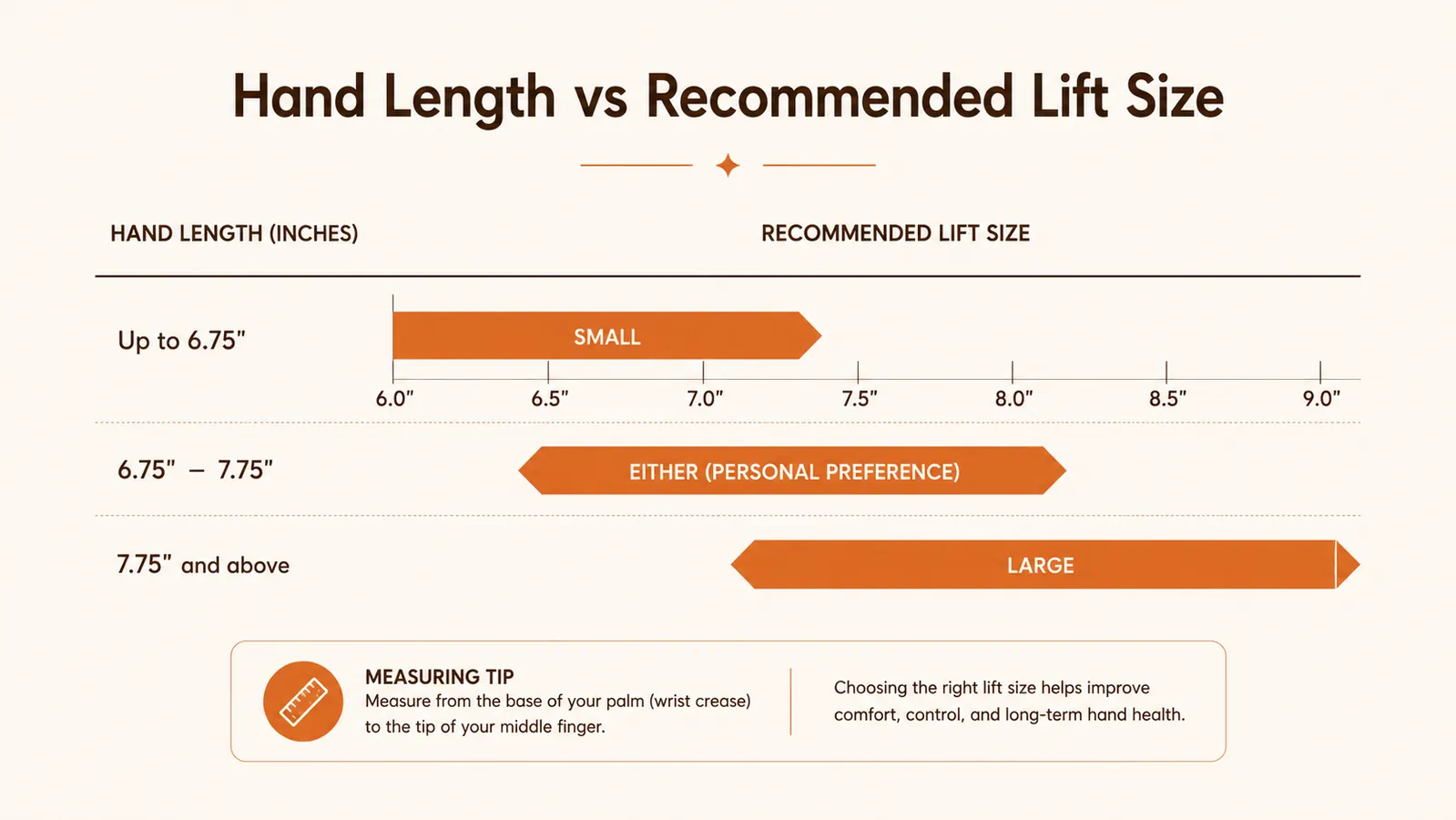
The Logitech Lift works the moment you plug in the receiver, the cursor moves, the left and right clicks register, and the scroll wheel scrolls. What does not happen automatically is the part that actually makes this mouse worth the switch, the two customizable side buttons and the free-spin scroll toggle. Those require Logi Options+, a separate piece of software you have to find, download, and install yourself, and the retail box gives it exactly one small line of text near the bottom, easy to miss if you toss the box before reading it closely.
On a Mac, installing it also means granting accessibility permissions in system settings, a step that trips up a fair number of first-time buyers based on what shows up in the reviews, since the software will not remap anything until that permission is approved manually through a menu most people have never opened before. I did not need this step on my own Windows desktop, it installed and ran without any extra clicking, but the Mac side of it is a real extra ten minutes that the packaging does not warn you about anywhere.
Skip the software entirely and you still get a working mouse, quiet clicks and a comfortable angle, but you lose most of what separates this from a cheaper vertical option. I have seen reviews where someone rated the mouse down for feeling basic, only to describe using it straight out of the box with no software installed at all, which is a bit like judging a smartphone without ever downloading an app. The software is not optional if you want the full feature set, even though the box treats it like an afterthought worth one line of tiny print.
Relearning Where Your Thumb Actually Lands
Even once the software is installed and the sizing is right, there is a real physical relearning curve that the listing photos gloss over completely. On a flat mouse, your thumb rests along the side and the back and forward buttons sit roughly where your thumb naturally falls without any thought. On the Logitech Lift, the whole hand is rotated, so those same buttons sit at a different angle relative to your thumb, and for the first several days I kept missing them, hitting the top edge of the shell instead of the button itself more times than I would like to admit.
It is a small thing, but it adds up during a normal workday of tab switching and browser navigation, the exact moments where you want a button press to be automatic rather than something you have to glance down and check. It took me a little over a week before my thumb found the buttons without looking, closer to nine or ten days than the two or three some quick reviews suggest, probably because those reviews get written before that muscle memory has actually had time to form properly.
I also had to remap which button did what through Logi Options+ before it felt right, since the factory default assignments were not the ones my hand wanted to reach for first. Once I moved forward and back to the positions my thumb kept drifting toward anyway, the whole thing settled in faster. That is a fix most people never discover, because it requires already knowing the software exists, which loops right back to the step the box barely mentions in the first place, one small line most buyers scroll past without a second thought.
Why This Mouse Actually Gets Returned
Between my own experience, my brother-in-law's week with it, and a genuinely large pile of reviews, three reasons account for almost every return I came across, and none of them are about the mouse failing mechanically. The first is sizing, someone with larger hands ordering the only shell available and finding it cramped by the end of a workday. The second is hand dominance, a left-handed buyer picking up the standard listing without realizing a separate version exists for them, sometimes only discovering it after the mouse is already sitting unopened on a shelf.
The third reason is expectation around comfort timing. A number of reviewers described returning the mouse within the first week because their hand still felt awkward, without ever installing Logi Options+ or giving the thumb-button layout the week or two it usually takes to settle. I went through a similar adjustment myself, and if I had judged it on day three the way some returns clearly were judged, I would have sent it back too. I laid out that full adjustment timeline, battery behavior, and coating wear in my longer review after months of daily use, since a few days is not enough time to know whether a mouse like this is actually working for you.
None of these three reasons are really about the Logitech Lift being a bad mouse. They are about the listing not preparing buyers for the parts of the experience that happen before the mouse gets a fair shot, sizing, hand dominance, and the software step. If you handle those three things correctly going in, based on what I have seen and read, the odds of actually liking this mouse go up considerably. If you also want to see exactly how it stacks up against a plain flat mouse feature by feature, price tier included, I put that comparison together in Logitech Lift vs a regular mouse.
What I Liked
- Quiet, consistent clicks that have not developed rattle or double-click issues
- Small shell fits average and smaller hands comfortably once sized correctly
- Logi Options+ software unlocks real customization once you find and install it
- USB receiver connection has been reliable with no dropouts in daily use
- AA battery has lasted months without needing a swap
Where It Falls Short
- Single shell size is easy to confuse with the larger MX Vertical, and can feel cramped for bigger hands
- No obvious left-handed option on the standard listing, it is a separate product entirely
- Full functionality requires installing Logi Options+ separately, which the box barely mentions
- Thumb button placement takes over a week to feel automatic, longer than most quick reviews suggest
- Mac users have an extra permissions step the packaging does not warn you about
Almost none of the real complaints were about how the mouse performs once it is set up correctly. Nearly all of them were about the setup itself.
Who This Is For
This is a solid pick for a right-handed person with an average or smaller hand who is willing to spend ten minutes checking the sizing chart, installing Logi Options+, and giving the button layout a week or two to feel automatic before judging it. If you already know you will actually download the software instead of leaving it in the box, and your hand fits the chart, most of the friction I ran into simply will not apply to you.
It is also a reasonable pick for someone switching from a flat mouse after noticing tightness by the afternoon, as long as you go in expecting a real adjustment period rather than instant comfort. Reading the sizing chart and installing the software before you even open the mouse fully will save you from the two most common reasons people end up disappointed with it.
Who Should Skip It
Skip this specific listing if you are left-handed, since you will want to search out the dedicated left-handed version instead of forcing the standard shell into your left hand. Skip it too if your hands run larger than average and you have not measured against Logitech's chart, or if you are not willing to install extra software, since without Logi Options+ you are really only getting a quieter, oddly angled mouse rather than the full customizable version people actually recommend.
It is also worth skipping for now if you need a mouse today for a deadline this week. Between the sizing check, the software download, and the week or so it takes your thumb to relearn button placement, this is not a same-day fix. Order it for a slower stretch of work where a few days of reduced accuracy will not cost you anything important.
Sized Right and Ready for the Software Step?
If your hand matches the chart and you are prepared to install Logi Options+, the Logitech Lift is worth a real look. Check today's price on Amazon before you decide.
Amazon Check Today's Price on Amazon →