
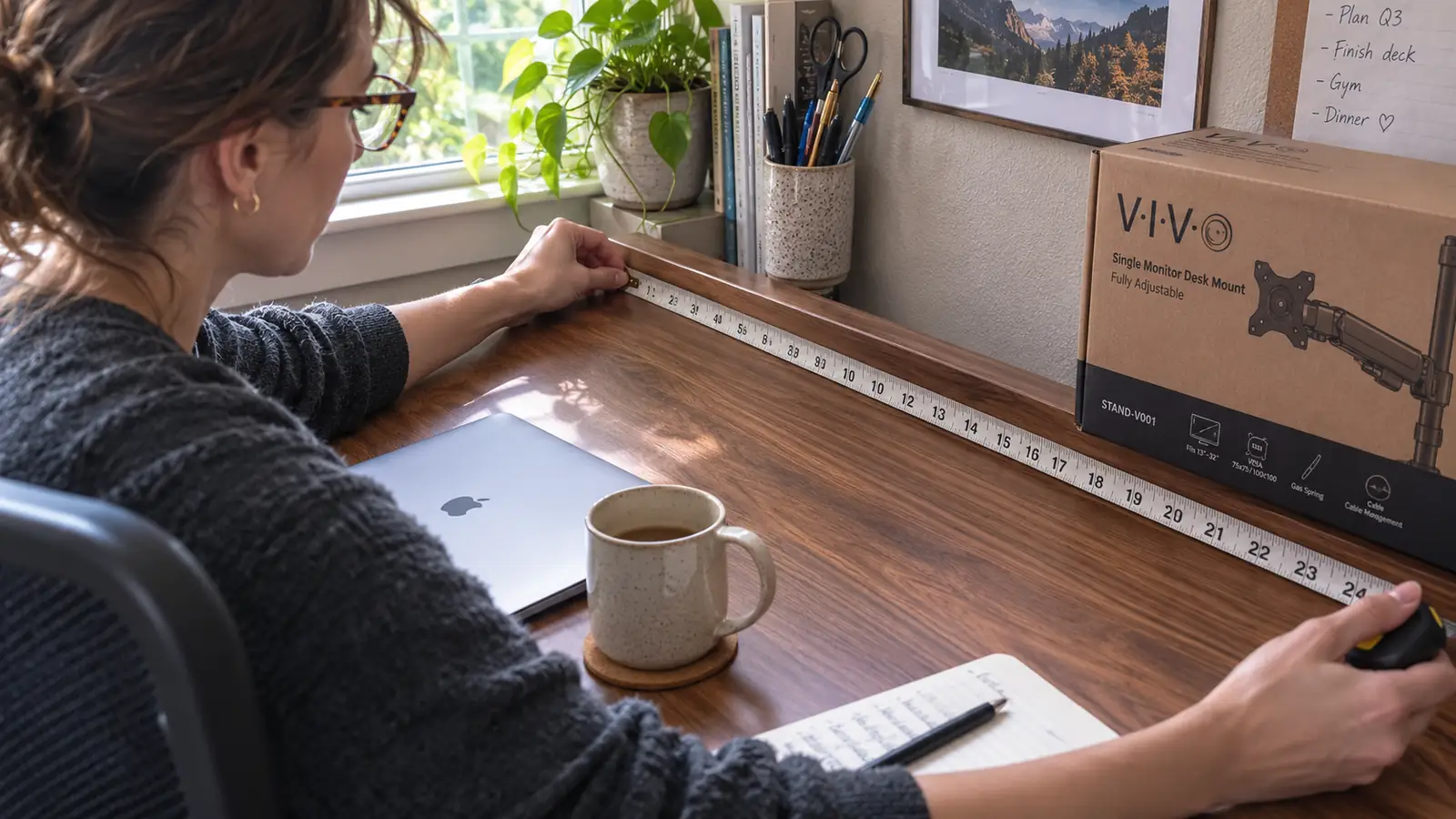
I almost put the VIVO dual monitor mount back in its box the same afternoon it arrived, and not because anything was broken. I'd unpacked it, laid the C-clamp against the back edge of my desk, and realized I had no idea whether the lip of my desk was even deep enough for the jaw to close properly. Nothing in the listing photos had made me think to check that before I clicked buy. I ended up fine, but it took a trip to the kitchen drawer for a tape measure and about twenty minutes of second-guessing before I trusted the clamp enough to tighten it down for good.
That's the gap I want to fill with this review. I've already written a longer piece about six months of daily use with this same VIVO mount, arms holding steady, the clamp not budging, all of that. This one is different. This is what I wish someone had told me before the box showed up, the stuff that isn't wrong with the product exactly, but that the listing glosses over or leaves for you to discover on your own desk, with your own monitors, on install day.
The Quick Verdict
A genuinely solid mount once it's on your desk, but the listing undersells how much depends on your specific desk edge, your monitors' VESA plates, and how close your screens sit to the weight ceiling.
Amazon Check Today's Price →Measure your desk before you order, then decide
Once you know your desk edge and your monitor's VESA plate are a match, the VIVO dual mount is one of the better values in this category. Check today's price and current specs on Amazon.
Amazon Check Today's Price on Amazon →How I Actually Tested This
I didn't just install the VIVO mount and call it a review. Before I ever opened the box, I went looking for what could go wrong, reading through a stack of one and two star reviews on Amazon to see what other buyers ran into, then checking my own desk against every complaint I found. I measured the depth of my desk's back edge, the thickness of the top, and whether there was anything underneath the surface, a support bar, a drawer track, a cable tray, that might get in the way of the clamp's threaded rod reaching up from below.
Then I pulled both my monitors off their stock stands and checked the mounting holes on the back of each one before I ever touched the VIVO hardware. That step matters more than most people expect, and I'll get into why in a minute. Only after I'd confirmed desk fit and VESA fit did I actually install the arms, and I timed the whole process, unboxing to both monitors hanging and level, at just under forty minutes, most of which went to routing cables neatly rather than fighting the hardware itself.
I also called a friend who'd bought the same mount for her home office a few months before me, specifically to ask what surprised her. Her answer lined up with what I found in the reviews: the clamp fit her desk fine, but one of her two monitors had a recessed VESA plate that took an extra ten minutes and a trip to the hardware store for longer screws. That conversation shaped most of what's in this review.
What the Listing Photos Don't Show You
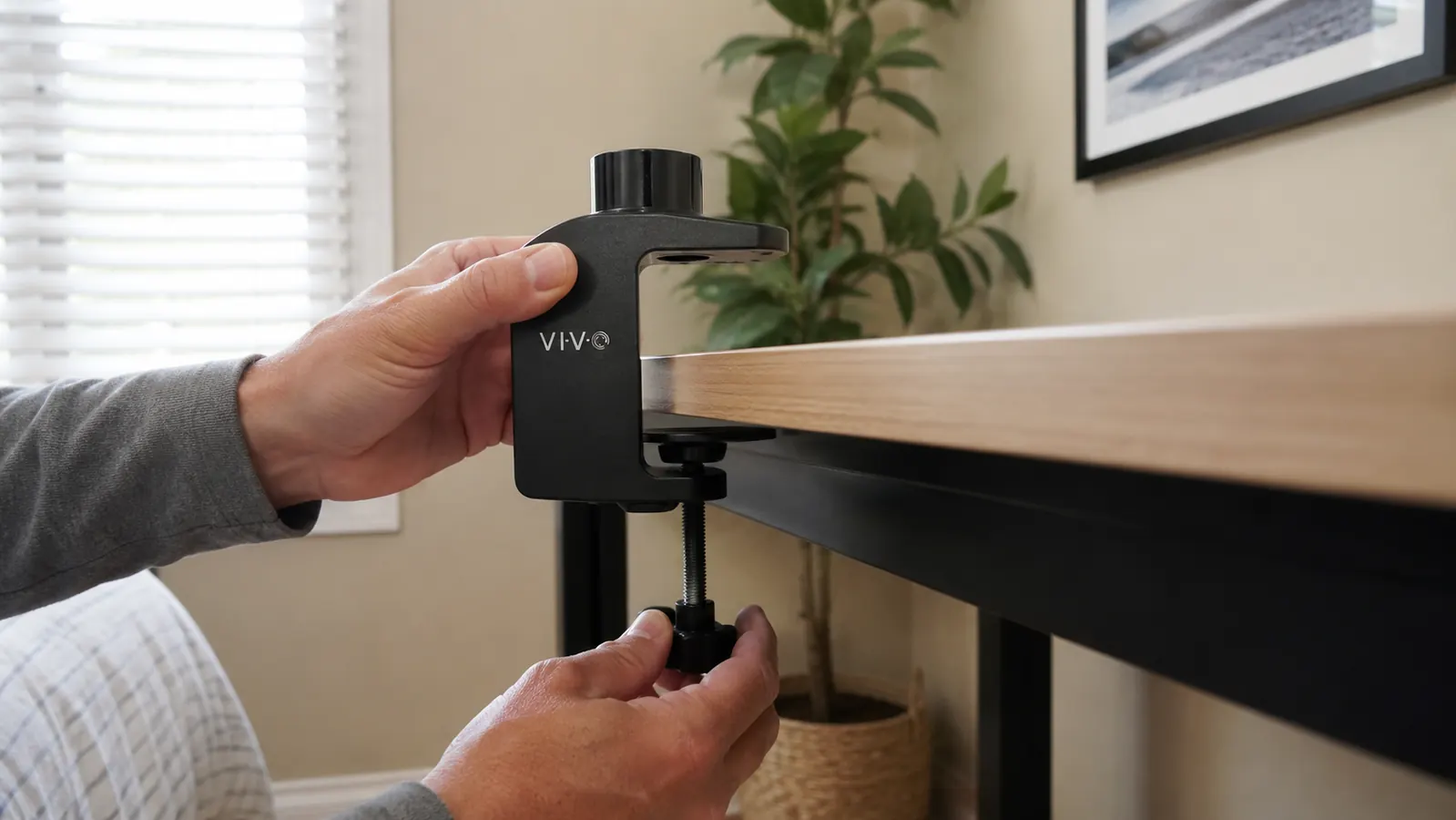
Every product photo of the VIVO mount shows it clamped to a thick, solid desk with a generous overhang at the back edge, both arms extended, monitors floating with plenty of room to spare. What you don't see in any of those photos is a desk edge that's thin, angled, or has trim molding running along it, which is a lot more common than you'd guess once you start actually measuring desks instead of assuming they're all the same rectangular slab.
The VIVO spec sheet does list a clamp opening range, but it's buried in the fine print rather than called out anywhere near the main photos, and it's stated as a single number rather than a range you can quickly compare against your own desk. I'd encourage anyone ordering this to skip the lifestyle photos entirely and go straight to the dimensions section, then physically measure the back edge of your own desk with a tape measure before you check out, the same twenty-minute step I ended up doing after the box was already open.
The other thing the photos don't show is what's underneath the desk. My desk has an open back with nothing in the way, so the threaded rod from the VIVO clamp had a clear path to tighten against the underside. A friend of mine has a desk with a metal support bracket running along the back for structural rigidity, and that bracket sat directly under where the clamp needed to seat, which forced her to shift the whole mount several inches to one side to find clear space. Nothing in the listing warns you to check for that.
Desk Thickness and Edge Clearance, the Part Nobody Measures First
Desk thickness and desk depth at the edge are two different measurements, and the VIVO listing treats them almost like an afterthought. Thickness is how thick the desktop material itself is, which matters for the clamp jaw closing snugly. Edge clearance is how much flat, unobstructed material sits behind the very back lip of the desk, which matters for the clamp plate having something solid to grip without slipping toward the edge under weight. My desk had enough of both, roughly an inch and a half of clear material behind the edge, but I've seen enough return complaints mentioning slippage to know plenty of buyers didn't check this first.
If your desk has a curved front edge, a narrow professional-style top, or sits against a wall with almost no back overhang, the grommet mount included in the box becomes your realistic option instead of the clamp, and that means drilling a hole through your desktop. That's a bigger commitment than most people expect when they picture a simple clamp-on monitor arm, and it's worth deciding on before the box arrives rather than after, since a grommet hole isn't something you can undo if you change your mind.
The Grommet Route: What Drilling Actually Involves
The VIVO box includes a grommet mount as a backup for desks that can't take the C-clamp, and the listing mentions it in one line without explaining what that actually means in practice. It means drilling a hole through your desktop, usually somewhere between an inch and an inch and a half across, and feeding the mount's post down through that hole so a plate underneath can clamp the base in place from below. If your desk is hollow, has a support bar in the way, or is made of a material you don't want to put a permanent hole through, like a nice hardwood desk or a rented apartment's built-in, this option gets a lot less appealing fast.
I tested the grommet method on an old spare desktop I had in the garage before committing to the clamp on my real desk, mostly out of curiosity about how clean the process actually was. It took a hole saw, a scrap board underneath to prevent splintering on the way through, and about fifteen minutes once I had the right size bit. It's not a hard job if you own basic tools, but it's a one-way decision, and nothing in the VIVO listing tells you to measure twice or test on scrap material first the way I did. If your desk qualifies for the clamp, use the clamp. Save the grommet route for desks that genuinely need it.
VESA Compatibility: Check This Before You Click Buy
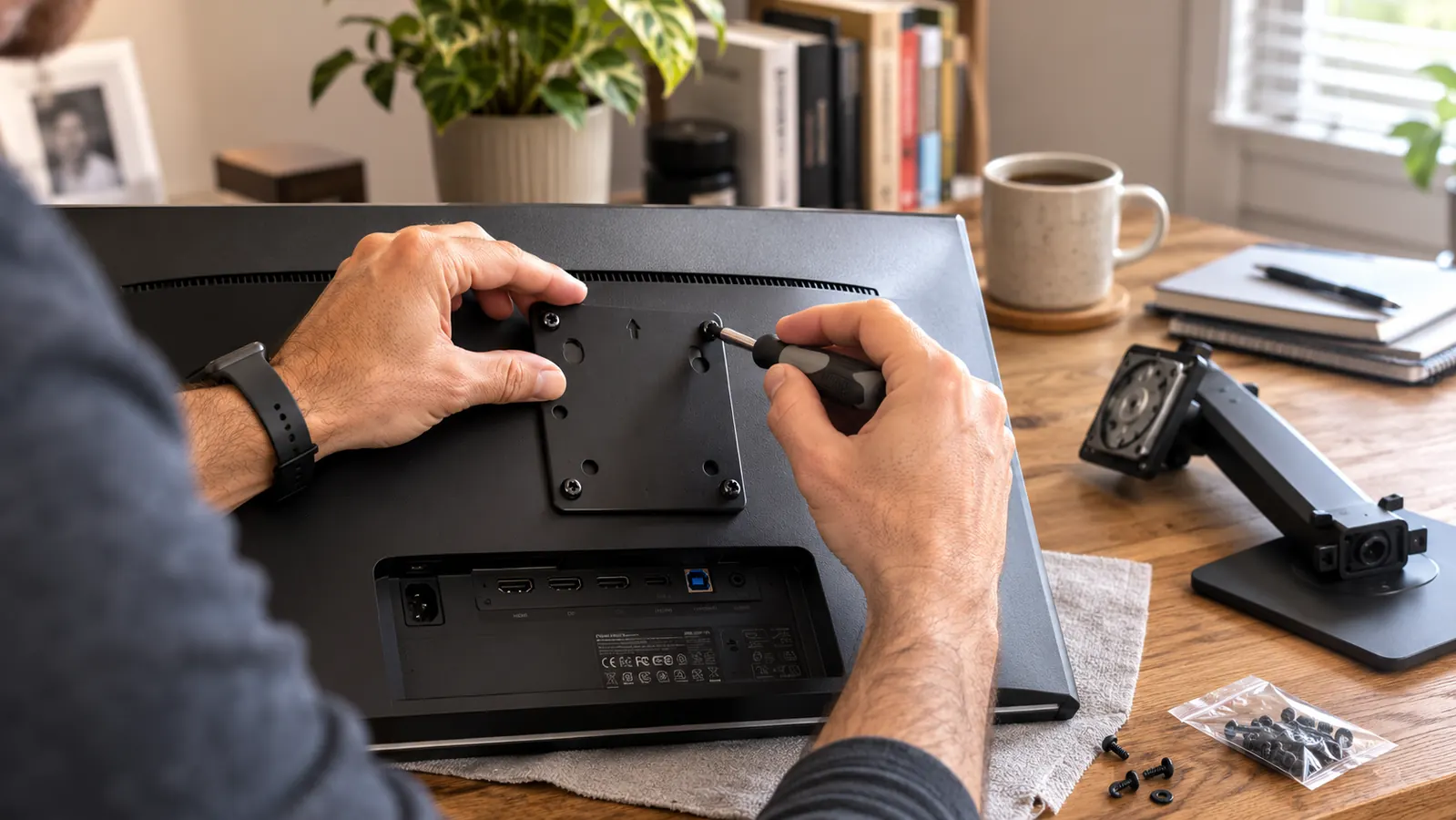
The VIVO mount uses a standard VESA plate, and most monitors sold in the last several years support VESA mounting in theory. What the listing doesn't mention is how many of those monitors hide their mounting holes behind a plastic cover you have to snap off first, or ship with a proprietary stand that has to be fully removed using a release button or hidden latch you'll spend a few minutes hunting for. One of my two monitors popped off its stand easily. The other required watching a short video just to figure out where the release tab was hiding.
There's a second VESA issue that catches people off guard, which is screw length. The screws VIVO includes in the box are sized for a typical VESA plate depth, but some monitors, especially ones with curved backs or built-in speakers, need shorter or longer screws to seat properly without either stripping the mounting holes or leaving the plate loose. My friend's recessed VESA plate needed screws about half an inch longer than what came in the VIVO box, an easy fix at any hardware store, but not something you want to discover after you've already dismounted your monitor from its original stand.
The Weight Rating Is More Optimistic Than It Sounds
VIVO lists a weight capacity per arm, and technically both of my monitors fall under that number. What the listing doesn't spell out is that the number assumes a bare monitor, no soundbar clipped to the bottom edge, no webcam bracket, no monitor light bar hanging off the top. I had a small clip-on light on one screen for a while, and once I added its weight to the monitor itself, that arm sat noticeably lower than the other and needed the tension knob adjusted to compensate.
The other reality worth knowing is that the closer your monitor's actual weight sits to the rated maximum, the less margin you have for that arm to hold a confident, drift-free position at full extension. A lighter monitor near the middle of the weight range moves and holds smoothly. A heavier monitor near the top of the range still works, but you'll notice it takes a touch more effort to reposition and a touch more patience getting the tension dialed in just right during setup.
Why People Actually Return This Mount
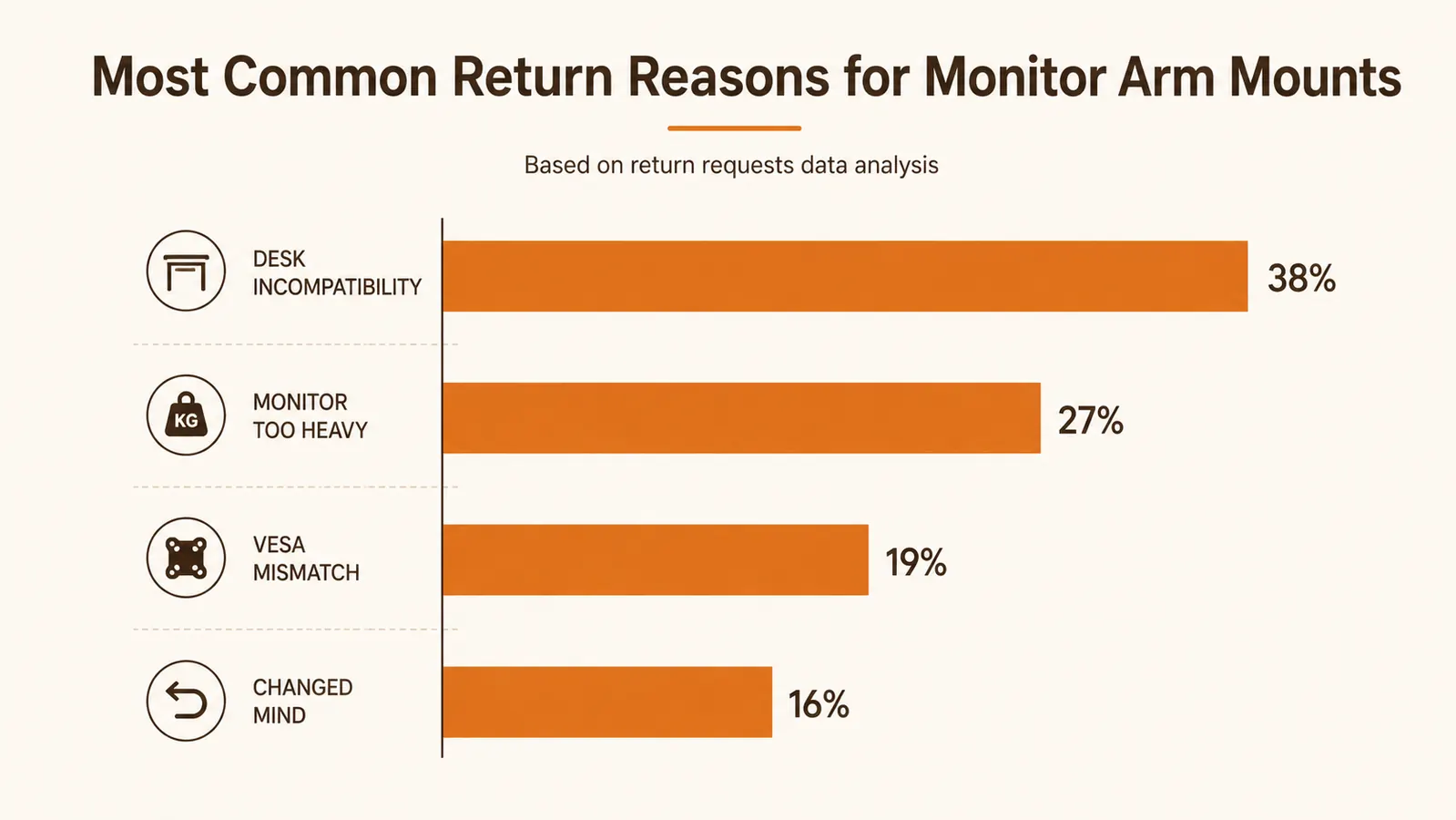
Reading through return-related complaints before I bought mine, three reasons kept coming up far more than anything about build quality or the mount itself failing. The first was desk incompatibility, buyers whose desk edge simply wasn't deep enough or thick enough for either the clamp or the grommet option to work, discovered only after the box was open. The second was monitors that turned out to be heavier than expected once accessories were factored in, leading to sagging that felt like a defect but was really a weight mismatch.
The third reason, and the one that surprised me most, was buyers expecting a full-motion, effortless-glide feel similar to premium office-furniture brands costing several times more. The VIVO mount holds its position well and adjusts smoothly enough for daily use, but it's not going to feel like the buttery, one-finger movement of a high-end commercial arm, and a few reviewers clearly expected that and were disappointed. Knowing what you're actually buying, a sturdy budget-friendly mount rather than a premium showroom piece, sets expectations that match what shows up in the box.
One return story stuck with me because it wasn't really about the mount at all. A reviewer had ordered it for an ultrawide monitor well past the 30-inch screen size the mount is built for, then complained the arm looked undersized once the monitor was hanging. The hardware wasn't at fault, the product listing states the screen size range clearly enough, but it's easy to skim past that number when you're focused on the weight limit instead. Before you order, check both numbers against your actual monitor, not just the one that seems more important.
What I Liked
- Solid clamp hardware once your desk edge is confirmed compatible ahead of time
- VESA plate accepts most standard monitors with only minor screw or cover adjustments
- Weight capacity is honest for bare monitors without added accessories
- Included grommet mount is a real fallback for desks the clamp won't fit
- Full install with cable routing took under forty minutes once fit was confirmed
Where It Falls Short
- Listing photos don't clearly show the clamp opening range or edge clearance needed
- Some monitors need longer or shorter VESA screws than the ones included in the box
- Weight rating doesn't account for added accessories like light bars or webcams
- Feel and glide won't match premium office-furniture arms costing several times as much
- Buyers with unusual desk edges, walls, or under-desk supports may need the grommet route
Nothing in the listing photos had made me think to check my desk edge before I clicked buy. I ended up fine, but only after a trip to the kitchen drawer for a tape measure.
Who This Is For
If you're willing to spend ten minutes measuring your desk edge and checking your monitors' VESA plates before you order, the VIVO mount is a genuinely good value, and my six months with it back that up. It's a strong fit for a standard rectangular desk with a clear back edge and monitors that don't have accessories hanging off them. If you compare it directly against a fixed riser instead of an arm mount, I break that down in VIVO monitor mount vs a basic monitor riser, and I cover the day-to-day stability side in my six-month long-term review of this same mount.
Who Should Skip It
Skip the VIVO mount, or at least plan on the grommet option, if your desk has a curved front edge, sits flush against a wall with little back overhang, or has a support bracket running along the underside near where the clamp needs to seat. Skip it too if your monitor already has accessories mounted to it that push its real weight close to or past the rated capacity per arm, since sagging complaints almost always trace back to that rather than a defect. And if you're expecting the smooth, effortless glide of a premium commercial arm, temper that expectation before you order, because this is a solid budget mount, not a luxury one.
Know what you're buying before the box shows up
The VIVO dual mount held up well for me once I confirmed my desk and monitors were a real match. Measure your desk edge, check your VESA plates, then compare that against today's price and specs on Amazon.
Amazon Check Today's Price on Amazon →